For this weeks Tech Task I used the Google Search Bar as a Timer. I never knew you could do this and it's probably the easiest and quickest Tech Task I have done so far!
For anybody in the CDM course who doesn't know me yet my name is Seán Clarke and I'm 24 (until Sunday). I'm from Dublin and live in Swords which is about a 20 minute drive by car from the Blanchardstown Campus or what feels like an 8 hour bus journey in the mornings. I'm not going to talk too much about my upbringing or anything but more about what life in lockdown has been like for me. Enjoy and I hope I don't bore anybody too much! So the first time I heard about Coronavirus I didn't think anything of it really and I think majority of people felt the same. I thought it was going to be like the bird flu and that it was being blown out of proportion. The first time I think it felt real for me was when Daniel McSweeney came in to our lecture and gave us an update on how it was going to affect our college life. It was quite daunting at first and it made me nervous for both the rest of the semester and life in general. The last sense of normality I was trying to t...
This week I started developing my Game Design Document. I created it using the website Dundoc which had me very confused at the start but once I got the hang of it I was fine! The link to my document can be found here . I'm happy with what I have included so far and I I will update continuously over the next few weeks and my game develops! Image Information: A screenshot of the introduction to my Game Design Document
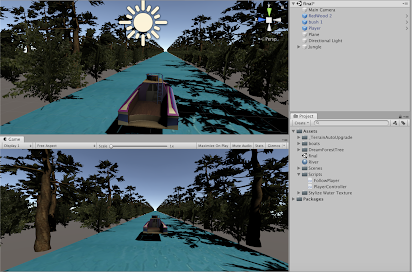
So this week we had to start creating our game. It's been a busy week so the first thing that I done was set a timer on my phone for 3 hours and sat down to get the work done. What I achieved this week: -Creating Project -Organising Assets needed -Creating River for scene -Creating Jungle for scene -Bringing the Player (boat) into scene -Creating FollowPlayer and PlayerController Scripts Creating Project The first thing that I did is the easiest part of the whole project - creating the project file in Unity. I went to Unity Hub and created a new 3D project which opened up my new scene. Organising Assets Needed The next thing that I did was looked back on my Game Idea research where I had posted some different links to assets, I gathered the ones I needed and used them along with a few new tutorials to complete the headings below. Creating River for Scene When making the river I created a new Game Object on Unity and under the 3D option I chose "Plane". I then went to Go...


Comments
Post a Comment