Posts

Showing posts with the label Project

Beta

Image
So in my Tutorial blog post for this week I spoke about trouble I had with certain elements of my game deleting. This included the sky, timer and coins disappearing. So my aim this week was to go back on the tutorials I had already completed and redo these steps. What I completed this week:  Creating Finish Line Placing Obstacles  Reintroducing Coins and Sky What I tried to do but failed:  Scoring System with Coin Collection Noise Creating Finish Line The first thing I completed this week was creating a finish line using a Unity Tutorial (this is my Unity Tutorial post for this week). It was very straightforward and took me probably less than an hour to get it functioning. One thing I do want to add to it is the texture a usual black/white finish line would have. When the player hits the finish line and completes the level the game automatically restarts the level. Placing Obstacles A few weeks ago I tried to create a Spawn Manager so my obstacles would randomly appear on...

Alpha

Image
So next up in the development of my game was the Alpha. Last week the things that I said I wanted to achieve were: Correcting Spawn Manager Introduce repeating scene of trees to complete my terrain Add Game Over message when Player impacts with obstacles What I did achieve was: Adding Mountains as Background Adding Collectable Rotating Coins Not going to lie this week was the toughest week I had so far with getting Unity to work and I'm disappointed with how little I got done. I spent about 2.5 hours on it and feel a little unmotivated at the moment because of the end result of this week.  The first thing I wanted to do was correct my Spawn Manager. I went to previous Unity Tutorials for help, the first time it didn't work so I completely restarted. I did the exact same process again, typed slowly, triple checked the coding but it still wouldn't work after nearly an hour trying so I gave up. My object is spawning on the spot at the moment but for it to be useful in my game ...

First Playable

Image
I continued on with developing my game this week and spent about 3/4 hours working on it. I think it went really well and I can see my game coming along nicely.  One challenge I was facing this week and last week was that Unity was running really slowly on my laptop. I was constantly waiting for it to reload but thankfully I figured it out. During last weeks development I added the trees to make my jungle. It ended up that I had about 600 different trees spanning the length of the river, doing this used 65GB of memory and slowed the laptop right down. To stop this I deleted majority of the trees, instead in the next few weeks I will use a repeat pattern that was shown in one of the most recent Unity Tutorials.  Comparing the image of my game last week to this week it kind of looks like I went backwards a step but I feel like I got loads of important steps done this week! What I achieved this week: Corrected Glitches from Last Week Last week I set up a FollowPlayer script to my...

Prototype

Image
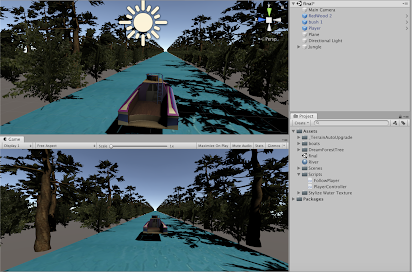
So this week we had to start creating our game. It's been a busy week so the first thing that I done was set a timer on my phone for 3 hours and sat down to get the work done. What I achieved this week: -Creating Project -Organising Assets needed -Creating River for scene -Creating Jungle for scene -Bringing the Player (boat) into scene -Creating FollowPlayer and PlayerController Scripts Creating Project The first thing that I did is the easiest part of the whole project - creating the project file in Unity. I went to Unity Hub and created a new 3D project which opened up my new scene.  Organising Assets Needed The next thing that I did was looked back on my Game Idea research where I had posted some different links to assets, I gathered the ones I needed and used them along with a few new tutorials to complete the headings below.  Creating River for Scene When making the river I created a new Game Object on Unity and under the 3D option I chose "Plane". I then went to Go...

Game Design Document

Image
 This week I started developing my Game Design Document. I created it using the website Dundoc which had me very confused at the start but once I got the hang of it I was fine! The link to my document can be found  here . I'm happy with what I have included so far and I I will update continuously over the next few weeks and my game develops!  Image Information: A screenshot of the introduction to my Game Design Document 

Game Vision Statement

Image
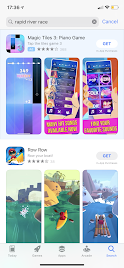
In my Game Vision Statement I will be going into detail about my game using the following headings: Introduction Description Key Features  Genre Platform Resources Required Links to Sources Concept Art Introduction   I hadn't even thought of a name for my game but have decided to go with "Rapid River Race".  Rapid River Race is a PC/Laptop one player game and it is a combination of Vehicle Simulation/Platform and Strategy. In it you will be in control of a boat sailing along a jungles river. You must collect coins and avoid obstacles before the time is up - if you do not - GAME OVER! Description The game will be set on a river in a jungle like location where you will be in charge of navigating the boat. In the game you will be racing against the clock to collect all the coins along the river. On your way you will face different obstacles like rocks and fallen trees which you must avoid. If you don't and you crash into these objects - the game is over. I went to the Ap...

Game Idea Research

Image
So last week our game idea research began and I had to brainstorm and come up with 4 possible game ideas.  They were: A Golf/Bowling Combination A Halloween themed bicycle game A Boat on a river collecting times A Supermarket Sweep inspired game After doing some research into each one, the game I decided to focus on for the rest of the semester is the one that involves a boat on a river collecting items. I have went for this particular one because after doing the Unity Tutorials over the past couple of weeks I think I have gained similar enough skills to do a decent job. I have looked on Unity and Youtube and have found multiple videos that have given me inspiration. 

Game Brainstorm

Image
Game Idea 1 In one of the first blog posts that I posted I spoke about how I am not much of a gamer. I used to play them when I was younger but it would always be WWE or Grand Theft Auto. I also used to play the Nintendo Wii. When I was thinking about game ideas I had to take into consideration that at this point I don't have a lot of skills. I start thinking about the games I liked as a kid and remembered that I used to love playing golf or bowling. So instead of just playing bowling in a usual alley, why couldn't I do both? So my first idea is to have the player being able to play a game of bowling on a golf course. I will include the usual layout of a golf course - Tee, Fairway, Green, Rough and Hazards. I will also have Golf Caddies and Spectators to make it feel like a real golf tournament. For my research into this idea I went to YouTube to find videos of the gameplay of both Golf and Bowling on the Nintendo Wii. This video for the golf gameplay is 11 minutes long so don...